ALINX AX7020, Stages 4 & 5: An Open Bitstream Over REST, and the One Missing Line That Hangs Both Cores
Stephan BökelmannStages 2 and 3 ended with a self-built Linux resident in QSPI flash, an FPGA manager registered in the kernel, and a promise: the next post would put a bitstream from the open toolchain into that FPGA over SSH. This is that post, and it goes further than promised. By the end of it the board accepts a bitstream over HTTP, checks it, loads it, and answers with the FPGA’s state; the LEDs blink; and nothing from Xilinx has run at any point between the Verilog file and the configured silicon.
It also contains, true to form, a bitstream that was perfectly valid and
still killed the board without a single log line, a kexec that will
happily jump into a device tree blob, and a flash chip that survives a
processor reset in a mode the boot ROM cannot read.
This covers Stages 4 and 5 of the
bitstream pipeline plan
for the AX7020 that ALINX sent me, plus the piece
of Stage 2 that was built in the last article but never actually executed:
the updater that fetches a fresh Linux from the network and boots into it
with kexec. Same structure as before: the walkthrough that works, then the
detours.
One honest framing up front, because it shapes the whole article: the end state described here is real, but it is manual. Every piece of the chain has been exercised once, by hand, on a board that had been power-cycled into a known state. The API runs in the board’s RAM and is gone after the next reboot. Turning this into a system that comes up on its own is the next stage, and the closing section says exactly what that involves.
$ curl -F file=@blinky.bit "http://10.42.100.134:8000/bitstream?sha256=$(sha256sum blinky.bit | cut -d' ' -f1)"
{"state":"operating","sha256":"f69a32d2…","bytes":4045524,"idcode":"0x03727093","filename":"blinky.bit"}
That is the end state. Here is the way there.
The seven checkpoints
Every step ends in something you can test, because, as the last two articles showed at length, the expensive failures on this board are the ones that pass every check you did think of.
| # | After | What must be true |
|---|---|---|
| 1 | open toolchain | make blinky.bin runs Yosys, nextpnr-xilinx, fasm2frames, xc7frames2bit and bit2bin.py to completion; the .bin starts with ffff ffff ffff ffff 6655 99aa |
| 2 | log channel | a test line written to /dev/kmsg on the board appears in the netconsole log on the workstation before any bitstream is loaded |
| 3 | first load | fpga_manager fpga0: writing blinky.bin, then rc=0 state=operating, and the board still answers on port 22 |
| 4 | kexec updater | the board fetches kernel, DTB and initramfs from an HTTP server, verifies three SHA256 sums, and comes back over SSH with uptime zero |
| 5 | Python on the board | uv run --python 3.12 starts an interpreter on an image that ships neither Python, nor a compiler, nor libgcc_s.so.1 |
| 6 | the API | POST /bitstream with the blinky answers operating and the LEDs blink; DELETE /bitstream clears the PL and the LEDs go dark |
| 7 | the API says no | a README uploaded as a bitstream, and a correct bitstream with a wrong checksum, are both rejected with a readable error and the FPGA is never touched |
If a checkpoint fails, everything before it is known-good. All self-written files (the bitstream flow, the load and JTAG scripts, the updater, the API) live in github.com/MaxClerkwell/ax7020-bringup.
The starting point
The board is where Stage 3 left it: mainline SPL and U-Boot in QSPI, and
behind them a FIT image holding a Yocto-built kernel plus an initramfs with
curl, dropbear, ntpd and kexec-tools. I have been calling that image the
maintenance system, and the name matters for this article: it is the
small, boring Linux that lives in flash and rarely changes, as opposed to
the large development images that are supposed to arrive over the network.
The board sits on the company network as ax7020 at 10.42.100.134,
reachable with a key over SSH. The FT232H JTAG adapter is plugged in again,
not because anything needs it to boot, but because Stage 1 taught me not to
start a session without a way to read memory on a board that has stopped
talking.
Goal of this session, in three parts: a bitstream from open tools into the FPGA, the updater actually updating, and an HTTP endpoint in front of the FPGA manager.
Step 1: A bitstream without Vivado
The toolchain
The Zynq-7020 is a 7-series device, so it is covered by the
openXC7 flow: Yosys for synthesis,
nextpnr-xilinx for placement and routing, and Project X-Ray for turning the
routed design into configuration frames and those frames into a bitstream.
Everything except Yosys was built from source under build/, nothing
installed system-wide:
| Tool | Version | Where |
|---|---|---|
| Yosys | 0.66 (Debian package) | /usr/bin/yosys |
| nextpnr-xilinx | openXC7 fork, 5f351cc2 (2026-08-29) |
build/nextpnr-xilinx/build/nextpnr-xilinx, chipdb xilinx/xc7z020.bin |
| prjxray | f4pga, c9f02d85 (2025-06-05) |
build/prjxray/build/tools/xc7frames2bit, utils/fasm2frames.py |
| prjxray-db | 77e52f1 (2026-08-26) |
build/nextpnr-xilinx/xilinx/external/prjxray-db/zynq7 |
| Python venv | fasm, prjxray | build/venv |
The chip database for the XC7Z020 has to be generated once from the prjxray-db; it is a few hundred megabytes and takes a while, and nothing in this article works without it.
The design
Deliberately boring, as promised in the plan: a 27-bit counter on the 50 MHz PL oscillator, four LEDs on the top bits.
module blinky (
    input  wire       sys_clk,
    output wire [3:0] led
);
    reg [26:0] cnt = 27'd0;
    always @(posedge sys_clk) cnt <= cnt + 27'd1;
    assign led = cnt[26:23];           // ~0.75 Hz on led[0], halved per LED

    (* keep *) PS7 ps7_i();            // see detour 1. Do not remove.
endmodule
The pin constraints are a plain XDC file: U18 for the clock, M14, M15,
K16, J16 for the LEDs, all LVCMOS33. The values come from the ALINX
schematic; nextpnr-xilinx reads the XDC directly, no conversion needed.
That last line, the PS7 instance, is the single most important line in this article. The first version of the file did not have it. What happens without it is detour 1, and it cost most of a day.
The flow
One Makefile chains four steps and a conversion:
blinky.v  --yosys synth_xilinx-->  blinky.json
          --nextpnr-xilinx---->  blinky.fasm      (placed and routed, XDC pins)
          --fasm2frames------->  blinky.frames
          --xc7frames2bit----->  blinky.bit
          --bit2bin.py-------->  blinky.bin       (header stripped, words byte-swapped)
$(TOP).json: $(TOP).v
	yosys -p "synth_xilinx -flatten -abc9 -arch xc7 -top $(TOP); write_json $@" $<

$(TOP).fasm: $(TOP).json $(TOP).xdc
	$(NEXTPNR) --chipdb $(CHIPDB) --xdc $(TOP).xdc --json $(TOP).json \
	    --write $(TOP)_routed.json --fasm $@

$(TOP).frames: $(TOP).fasm
	$(PYTHON) $(F2F) --part $(PART) --db-root $(DB_ROOT)/zynq7 $< > $@

$(TOP).bit: $(TOP).frames
	$(FRM2BIT) --part_file $(DB_ROOT)/zynq7/$(PART)/part.yaml \
	    --part_name $(PART) --frm_file $< --output_file $@

$(TOP).bin: $(TOP).bit
	$(PYTHON) ../bit2bin.py $< $@
The last step exists because the kernel’s zynq-fpga driver does not want
a .bit file. It wants the layout that Xilinx’s bootgen produces: the
ASCII header of the .bit removed, and every 32-bit word byte-swapped. The
conversion is twenty lines of Python: find the sync word AA995566, keep
the 0xFF padding words in front of it, reverse every four bytes.
Checkpoint 1: xxd -l 16 blinky.bin shows ffff ffff ffff ffff 6655
99aa, the sync word in swapped order. Every tool in the chain ran on my
desk, and none of them came from Xilinx.
Step 2: A log channel before anything else
The very first load attempt of this project was made without this step. The result was a board that stopped answering, and nothing else: no kernel message, no panic, no hint which of the dozen possible causes had struck. Stage 1 had the same lesson with U-Boot; apparently it needed relearning with Linux.
The maintenance image has CONFIG_NETCONSOLE and configfs, so the kernel
log can be pointed at the workstation over UDP at runtime, no reboot. A
listener on the host, eleven lines of Python writing every datagram to a
file with a timestamp and the sender’s address, then on the board:
cd /sys/kernel/config/netconsole && mkdir host && cd host
echo eth0              > dev_name
echo 6666              > local_port
echo 6666              > remote_port
echo 10.42.100.134     > local_ip
echo 10.42.100.20      > remote_ip
echo f8:75:a4:40:9d:c3 > remote_mac
echo 1                 > enabled
echo "AX7020: netconsole test" > /dev/kmsg
The order is mandatory: every field first, enabled last. The remote MAC
has to be given explicitly because netconsole sends raw UDP without ARP;
it is the workstation’s MAC, not the switch’s.
Checkpoint 2: the test line shows up in the log on the host. From here on the board can die and still have last words.
Step 3: Loading the bitstream over SSH
The file goes over with cat because the minimal image has no
sftp-server and therefore no scp. The load itself is started detached,
so that the SSH session and the load do not die together if the board
does:
ssh root@10.42.100.134 'mkdir -p /lib/firmware; cat > /lib/firmware/blinky.bin; \
    md5sum /lib/firmware/blinky.bin' < blinky.bin

ssh root@10.42.100.134 'echo "AX7020: loading blinky.bin" > /dev/kmsg;
  setsid nohup sh -c "echo blinky.bin > /sys/class/fpga_manager/fpga0/firmware;
  echo AX7020: rc=\$? state=\$(cat /sys/class/fpga_manager/fpga0/state) > /dev/kmsg" \
  >/dev/null 2>&1 </dev/null &'
The FPGA manager only looks under /lib/firmware; you write a name into
the sysfs node, not a path. Loading again means the same command again:
the PL is cleared and rewritten. There is no unload, which becomes relevant
in Step 6.
With the PS7 line in the design, this is what the netconsole log shows:
AX7020: loading blinky.bin (PS7) via fpga_manager
fpga_manager fpga0: writing blinky.bin to Xilinx Zynq FPGA Manager
AX7020: rc=0 state=operating
And read over JTAG, without halting anything (the technique is in detour 1):
| Register | Value | Meaning |
|---|---|---|
DEVCFG_INT_STS |
PCFG_DONE set |
the PL is configured |
LVL_SHFTR_EN |
0xf |
the driver enabled the PL to PS level shifters |
FPGA_RST_CTRL |
0x0 |
PL reset released |
/sys/class/fpga_manager/fpga0/state |
operating |
the driver reached its last line |
Four LEDs blink at 0.75 Hz and down. The board stays reachable over SSH.
Checkpoint 3 reached, and with it Stage 4. The chain Verilog, Yosys,
nextpnr-xilinx, prjxray, bit2bin.py, SSH, FPGA manager has run once,
end to end, with no proprietary tool in it. All of that is packaged in
tools/stage4-first-load/load-bitstream.sh, which sets up the netconsole,
uploads, loads detached and reports the outcome in one call.
Step 4: The updater, finally running
Stage 3 ended with an architecture I still stand by: a small maintenance
Linux in flash, and development images that never get written to flash but
are fetched over HTTP and started with kexec. The updater for that was
built into the image on 31 August. It had never been executed. IMAGE_URL
was empty, and the board simply stayed in the maintenance system, which is
exactly what it should do when it has nothing to update to.
Now it needed to run. The image server is one line:
cd build/images && python3 -m http.server 8080 --bind 10.42.100.20
The first test object was the maintenance image itself: if kexec works,
the same system should come back with uptime zero. It did not; the first
run killed the board, and the reason is detour 2, one of the more
instructive pieces of open-source archaeology in this project. The short
version: the updater had fetched the FIT image and handed it to kexec,
and on 32-bit ARM kexec has no FIT loader and does not check what you
give it. It jumped into a device tree.
The second version of the updater therefore does not use the FIT at all.
The host side, tools/publish-image.sh, copies kernel, DTB and initramfs
from the Yocto deploy directory under a timestamp and writes a manifest:
kernel zImage-20260910-105035            542ef58f…
dtb    zynq-ax7020-20260910-105035.dtb   1e3fa9c7…
initrd initramfs-20260910-105035.cpio.gz fbce1304…
latest.manifest is a symlink to the newest one. Any static web server
will do; file names are resolved relative to the manifest URL, so a
Nextcloud share works as well as python3 -m http.server.
On the board, /etc/ax7020-update.conf names the manifest, and
ax7020-update fetches the three files, verifies every SHA256, checks the
zImage magic at offset 0x24 and the DTB magic, and then:
kexec -l "$KERNEL" --dtb "$DTB" --initrd "$INITRD" --command-line "$CMDLINE"
kexec -e
CMDLINE is how a netconsole target with the host’s MAC gets into the new
kernel from its first line, and DRY_RUN=1 stops after kexec -l for
testing. An init script at rc5 priority 99 runs the updater fifteen
seconds after boot when IMAGE_URL is set, detached, with its output on
/dev/kmsg.
Measured hand-over on the company switch: kexec -e at 13:03:22, the new
kernel’s first line at 13:03:28, SSH back at 13:03:45. Twenty-three seconds
from one Linux to the next, nothing written to flash, no jumper touched.
Checkpoint 4: the board comes back over SSH, uptime says seconds, and
ls /etc/rc5.d | grep ax7020 shows the init script that the flash image
does not have. That last check is the only reliable way to tell the two
apart, which is a problem in its own right and is detour 6.
Step 5: Python on an image that has no Python
The API from the plan is a few hundred lines of Python. The maintenance image, by design, has no Python, no compiler, no DNS configuration, and a real-time clock that reads 2018 because, as Stage 3 found, the RTC sits behind an EMIO pin that does not exist until the PL is configured.
The decision here was deliberate: try it in RAM first, build it into the image second. Everything in this step is undone by pulling the power, which makes every mistake cheap. So, in order:
printf 'nameserver 1.1.1.1\nnameserver 8.8.8.8\n' > /etc/resolv.conf   # ip=dhcp writes none
ntpd -n -q -p pool.ntp.org                                             # or every TLS certificate is "not yet valid"

curl -fsSL https://github.com/astral-sh/uv/releases/latest/download/uv-armv7-unknown-linux-musleabihf.tar.gz | tar xz
install -m 755 uv-armv7-unknown-linux-musleabihf/uv /usr/bin/uv        # there is no /usr/local/bin
uv python install 3.12
uv is a static musl binary, which is
the whole reason this works on a minimal image: it brings its own
interpreter and needs nothing from the host except a working network. It
needed one more thing, in fact, and that is detour 5: Python would not
start for lack of libgcc_s.so.1, which the Yocto build has lying around.
Two dead ends are worth recording. uv run without --python 3.12
silently downloads Python 3.14 instead of using the one just installed.
And uvicorn[standard] pulls in httptools, which wants a C compiler;
plain uvicorn is pure Python and perfectly adequate here.
Footprint in the RAM root filesystem:
| Component | Size |
|---|---|
| uv | 20 MB |
| Python 3.12 | about 110 MB |
| FastAPI, uvicorn, python-multipart | a few MB |
Of 491 MB of RAM-backed root filesystem, 357 MB were still free afterwards. None of it would ever fit into the 32 MiB of QSPI flash next to U-Boot and a kernel, which confirms the Stage 3 architecture decision in hindsight: the flash holds the small system, and anything with Python in it has to come over the network.
Checkpoint 5: uv run --python 3.12 python -c 'import fastapi' on the
board.
Step 6: The API
The service is one file, api/app.py, started on the board with:
cd /opt/ax7020-api
uv run --python 3.12 --with fastapi --with uvicorn --with python-multipart \
    uvicorn app:app --host 0.0.0.0 --port 8000
Three endpoints:
| Method | Path | Does |
|---|---|---|
GET |
/state |
FPGA manager state (unknown, operating, …) and what was loaded last |
POST |
/bitstream |
multipart file=, .bit or .bin, optional ?sha256=; checks sync word and IDCODE, converts a .bit, loads, answers when the PL is up |
DELETE |
/bitstream |
loads empty.bin, a design containing nothing but the PS7 tie-offs, and so clears the PL |
The DELETE is a workaround for a fact about the FPGA manager: it has no
unload. The only way to make the fabric stop doing something is to load
something else, so “clear” means loading a design that does nothing. That
empty design is built with the same flow as the blinky, from a Verilog
file whose entire body is the PS7 instance. Without the PS7 line it would
hang the board exactly like the first blinky did.
The plan said validation was the part I refused to hand-wave, so here is
what POST actually checks before the FPGA manager sees a single byte:
- The checksum, if the caller gave one. A mismatch is a 400 and the upload is discarded. This is the cheap guard against the truncated or wrong file, and on this board, after the flash bug of Stage 3, I no longer trust any transfer I did not verify.
- The sync word. A
.bitcontainsAA995566after its ASCII header; an already converted.bincontains the swapped665599AA. If neither is found, the file is not a bitstream and is rejected with that message. A.bitis converted in place with the same logic asbit2bin.py. - The IDCODE. Early in every 7-series bitstream is a type-1
configuration packet writing the IDCODE register: the command word
0x30018001followed by the device ID. The service finds that packet and compares the following word, masked to the lower 28 bits, against the XC7Z020’s0x23727093. The upper four bits are the silicon revision; the bitstream carries0x03727093, hence the mask. The FPGA would refuse a wrong IDCODE on its own, but silently and after the load had started. Refusing it here gives the caller a sentence instead.
Only then is the file written to /lib/firmware under a name derived from
its hash, the name written into the FPGA manager, and the manager’s state
read back. Anything other than operating is a 500 with the state in the
message. FastAPI serves the interactive documentation at /docs on its
own, which on a 1 GiB embedded board feels faintly absurd and is genuinely
useful.
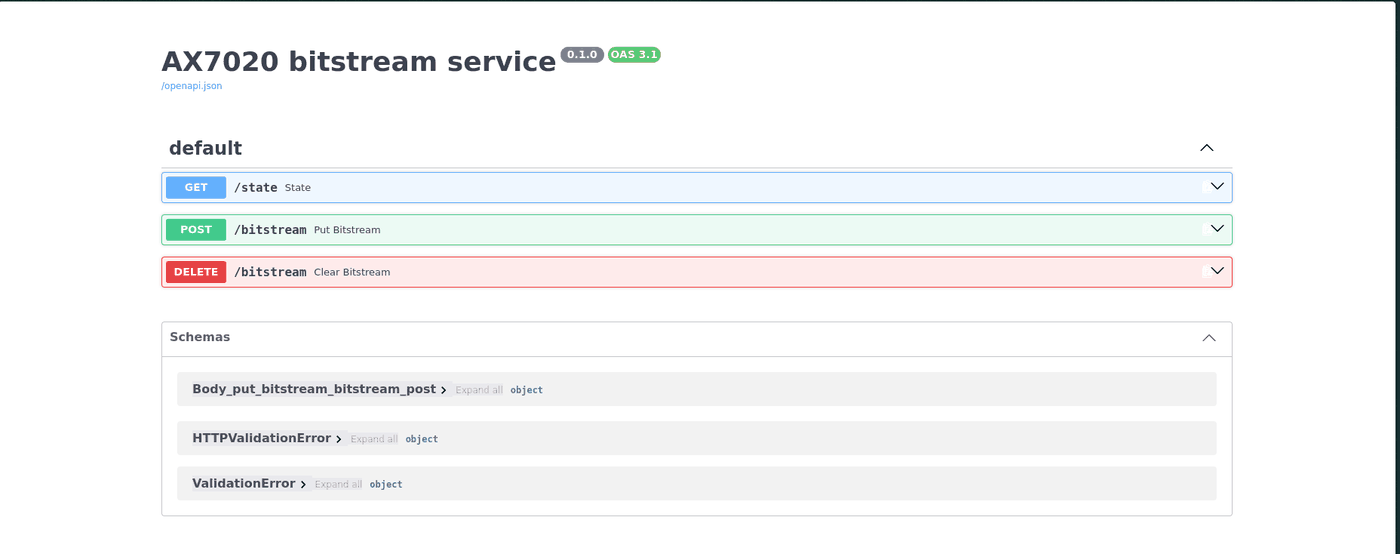
Six calls, all as expected:
| Call | Answer |
|---|---|
POST blinky.bit with ?sha256= |
operating, IDCODE 0x03727093, LEDs blink |
GET /state |
operating, loaded: blinky.bit |
DELETE /bitstream |
operating, loaded: empty, LEDs off |
POST blinky.bin |
operating |
POST README.md |
{"error":"no sync word found - not a bitstream"} |
POST with a wrong checksum |
{"error":"sha256 mismatch: …"} |
Checkpoints 6 and 7. Stage 5 exists. From a Verilog file on my desk to blinking LEDs on the board, the tools involved are Yosys, nextpnr-xilinx, prjxray, a Python script, HTTP, and a sysfs node. Every one of them has source I can read.
What this is not, yet
I said it at the top and it deserves its own section, because it is the difference between a demo and a system.
- Nothing survives a reboot. The flash still holds the maintenance
image of 31 August with the first, broken updater. The jump to the image
of 10 September was done by hand, by copying the new
ax7020-updatescript over and running it. uv, Python and the API live in RAM. - The maintenance image does not update itself.
IMAGE_URLis empty in the recipe. Until it is set there and a new maintenance FIT is flashed, a power cycle leaves the board sitting in the small system, waiting for someone to log in. - There is no image with the API in it. The service runs from a
hand-installed interpreter. It belongs in a Yocto image with Python,
FastAPI and an init script, published as
latest.manifest, so the updater pulls it on every boot. - No authentication. Anyone who can reach port 8000 can load a bitstream, and a bitstream with an AXI master can write anywhere in RAM. For a lab board on a private network that is an acceptable, labelled risk; for anything else it is the reason the API cannot ship as is.
The order of the next stage is therefore fixed, and it is the natural
completion of the Stage 3 architecture: build the large image with the API
started as a service; put IMAGE_URL into the maintenance recipe; flash
the new maintenance FIT once (tools/flash-fit.sh, the one operation on
this board that still needs a human to say yes); power cycle; and watch the
small Linux boot, fetch the large Linux, kexec into it, and bring the API
up with nobody logged in. That is the next article.
The detours
1. A valid bitstream hangs both cores, silently
The first blinky did not have the PS7 line. It was synthesised, placed,
routed and converted without complaint, and its .bin passed every check
in Step 1. Loaded through the FPGA manager, the netconsole log showed:
[11:16:15] AX7020: loading blinky.bin via fpga_manager now
[11:16:15] fpga_manager fpga0: writing blinky.bin to Xilinx Zynq FPGA Manager
Then nothing. No ping, no SSH, no panic, no oops. The netconsole was up, so if the kernel had printed anything, I would have seen it. It had not.
This is where the JTAG adapter earned its place. The Zynq’s debug access
port has an AHB-AP that reads physical addresses while the CPUs keep
running, so the state of a hung Linux can be inspected without halting
it and without trusting it. Four registers, via zynq.dap apreg:
| Register | Value | Meaning |
|---|---|---|
DEVCFG_INT_STS |
0x50023004 |
bit 2 = PCFG_DONE: the PL is fully configured |
LVL_SHFTR_EN |
0xf |
the driver enabled the PL to PS level shifters |
FPGA_RST_CTRL |
0xf |
PL reset still asserted: the driver never got further |
In drivers/fpga/zynq-fpga.c, zynq_fpga_ops_write_complete() does those
two things back to back: enable the level shifters, then release the
reset. The kernel had died between two consecutive lines of a driver.
The printk ring buffer can be pulled straight out of DDR through the same
access port: __log_buf from System.map, minus 0xC0000000 for the
physical address, 1 << CONFIG_LOG_BUF_SHIFT bytes. It ended at “writing
blinky.bin”. Then the program counters of both cores, which does need a
brief halt, resolved against System.map:
cpu0: pc 0xc06270cc  cpsr 0x800e01d3   -> ct_nmi_enter / ct_nmi_exit
cpu1: pc 0xffff1300  cpsr 0x800301d1   -> vector_fiq + 0x1c, FIQ mode
Linux on ARM treats FIQ as an NMI. Both cores were handling FIQs, without
end. The Zynq-7000 has direct interrupt lines from the PL into the
processor, IRQF2P[19:16]: nFIQ and nIRQ for each Cortex-A9, and they
bypass the GIC entirely. A Vivado design always contains the PS7 block,
which defines those inputs. A nextpnr design contains whatever you wrote,
and mine contained no PS7, so the lines were undriven. As long as the level
shifters are off the processor sees none of it. The moment the driver
enables them after PCFG_DONE, the fabric floods both cores with FIQs, the
driver never reaches the line that releases the reset, and there is nobody
left to print a message.
The counter-test settled it: switching the level shifters back off over
JTAG (the SLCR was unlocked, LOCKSTA = 0) moved cpu0 into die() and
cpu1 into vector_dabt. The kernel was already too damaged to recover,
but it only started moving once the PL was disconnected.
The fix is one line, taken from the nextpnr artyz7-20 example:
(* keep *) PS7 ps7_i();
nextpnr reports “Tieing unused PS7 inputs to constants” during placement,
and every PL to PS input, the interrupt lines included, is grounded.
Rebuilt, loaded: rc=0 state=operating. The rule, stated for anyone
building Zynq bitstreams with open tools: a Zynq design must instantiate
the PS7, even if it uses nothing of it. The vendor flow hides this from
you by never letting you omit it.
Two smaller lessons from the same morning. PCFG_DONE does not mean
“done”; the level shifters and the reset come after it, and only there
does it show whether the design and the processor agree. And the AHB-AP is
the tool for this class of problem: mdw after halt needs the phys
flag or produces a data abort, and a halted session leaves a core with
DSCR_DTR_RX_FULL set; zynq.dap apreg and a mem_ap target touch
nothing. One caveat: DDR read behind the L2 can be stale. The log buffer
was usable, jiffies was not.
2. kexec -l on 32-bit ARM accepts any file
The first version of the updater fetched the FIT image, checked that its
first four bytes were the FIT magic d00dfeed, ran kexec -l fitImage
and kexec -e. The HTTP server logged the download, and the board went
dark.
Over JTAG, A9_CPU_RST_CTRL read 0x22: cpu1 in reset with its clock
stopped. That is what machine_shutdown() does before kexec -e, so
the jump had really happened. The log buffer in DDR held random data; the
jump target had overwritten the kernel that was writing it.
The answer is in the kexec-tools source in the Yocto tree,
kexec/arch/arm/kexec-zImage-arm.c:
int zImage_arm_probe(const char *UNUSED(buf), off_t UNUSED(len))
{
	/* Only zImage loading is supported. Do not check if
	 * the buffer is valid kernel image */
	return 0;
}
There is no FIT loader for 32-bit ARM in kexec-tools 2.0.28, and the
zImage probe accepts anything. The updater had verified, carefully, that
the file was a FIT, and kexec had loaded the FIT as if it were a kernel
and executed the device tree. Hence the second updater: three files and a
manifest, and a check of the zImage magic at offset 0x24 that the
updater does itself, because nothing downstream will.
3. After a crashed kexec, a soft reset does not boot
Two resets through PSS_RST_CTRL over JTAG after detour 2 did not bring
the board back. The boot ROM parked at 0xffffff28, the same address as
on 30 August with a blank flash. The flash was not blank.
The 32 MiB W25Q256 needs 4-byte addressing to reach its upper half, and the Linux SPI-NOR driver switches it into that mode. A processor reset does not reset the flash chip. The boot ROM reads with 3-byte addresses, so it read garbage from a chip that was still in 4-byte mode and gave up. A soft reset after a cleanly running Linux worked, because the driver had restored the chip on shutdown. After a crash, only a power cycle helps.
4. The listener that wrote into a deleted file
Also from the first kexec attempt: the netconsole output was missing, and not because the board had not sent it. A listener from an earlier session still held UDP port 6666 and was faithfully writing every datagram into a log file that had since been deleted. The new listener had failed to bind and nobody had noticed. Two rules went into the load script: reuse a running listener instead of starting a second one, and use absolute log paths.
5. Python starts, then does not
uv python install 3.12 completed. Running the interpreter failed:
libgcc_s.so.1 was missing. The maintenance image is built without it,
because nothing in it needs it; the uv-provided Python is linked against
it. The Yocto build has the library at
tmp/work/cortexa9t2hf-neon-poky-linux-gnueabi/libgcc/13.4.0/image/lib/,
and copying it into /lib/ on the board fixed it. It goes into the image
recipe next, along with the other things a minimal image turns out not to
have: a resolver configuration, a clock, and a place to put binaries.
6. Three versions of the same system that look identical
At one point during Stage 5 there were three maintenance systems in play:
the one in flash from 31 August, the one on the HTTP server from
10 September, and whichever of the two was currently in RAM. Same kernel
version, same hostname, same prompt. Telling them apart meant grepping
/proc/cmdline for netconsole= or /etc/rc5.d for the init script,
which works and is absurd. A build stamp in the image, visible in
/etc/os-release and in the API’s /state, is a two-line change to the
recipe and goes in with the next build.
7. The SSH host key changes on every boot
Mentioned in the last article and worth repeating because it bit me on
every single power cycle of this session: the root filesystem is in RAM,
dropbear generates a fresh host key on every boot, and SSH refuses to
connect with REMOTE HOST IDENTIFICATION HAS CHANGED. ssh-keygen -R
10.42.100.134 before every session. Connection refused right after a
reboot means only that dropbear is not up yet. A persistent key in the
flash-resident image is on the list, right behind the build stamp.
Closing
The score this time: one bitstream that was correct and killed the board
anyway, one kexec that will execute anything you hand it, one flash chip
that outlives a processor reset in the wrong mode, and a handful of things
a minimal image does not have until you need them. The pattern from the
last two articles held again: the loud failures were cheap, the silent ones
were expensive, and the tool that resolved every silent one was a way to
read the machine’s state without asking the machine. The AHB-AP scripts in
tools/stage4-first-load/ are the part of this session I expect to reuse
most.
The plan from August is now exercised end to end: SPL instead of FSBL, Yocto instead of PetaLinux, Yosys and nextpnr instead of Vivado, a sysfs node instead of a programming cable, and an HTTP endpoint instead of a person. Every byte that reaches the chip came out of a toolchain whose source I can read.
What it is not yet is autonomous. The board I am looking at right now has
the API running because I put it there this afternoon, and the next power
cycle will take it away. The next stage makes that stick: the API becomes a
Yocto recipe and a service inside the large image, the maintenance image
gets its IMAGE_URL, the flash gets one last manual write, and from then
on the small Linux in flash boots, fetches the large Linux from the
network, kexecs into it, and the API comes up on its own. When that
works, unattended, from a cold power-on, the pipeline is finished. It now
does: cold power-on to a bitstream API, nobody logged in.
Everything is in
github.com/MaxClerkwell/ax7020-bringup:
the bitstream flow and both designs, the bit2bin converter, the load and
JTAG diagnosis scripts, the second updater with its publish script, and
the API.