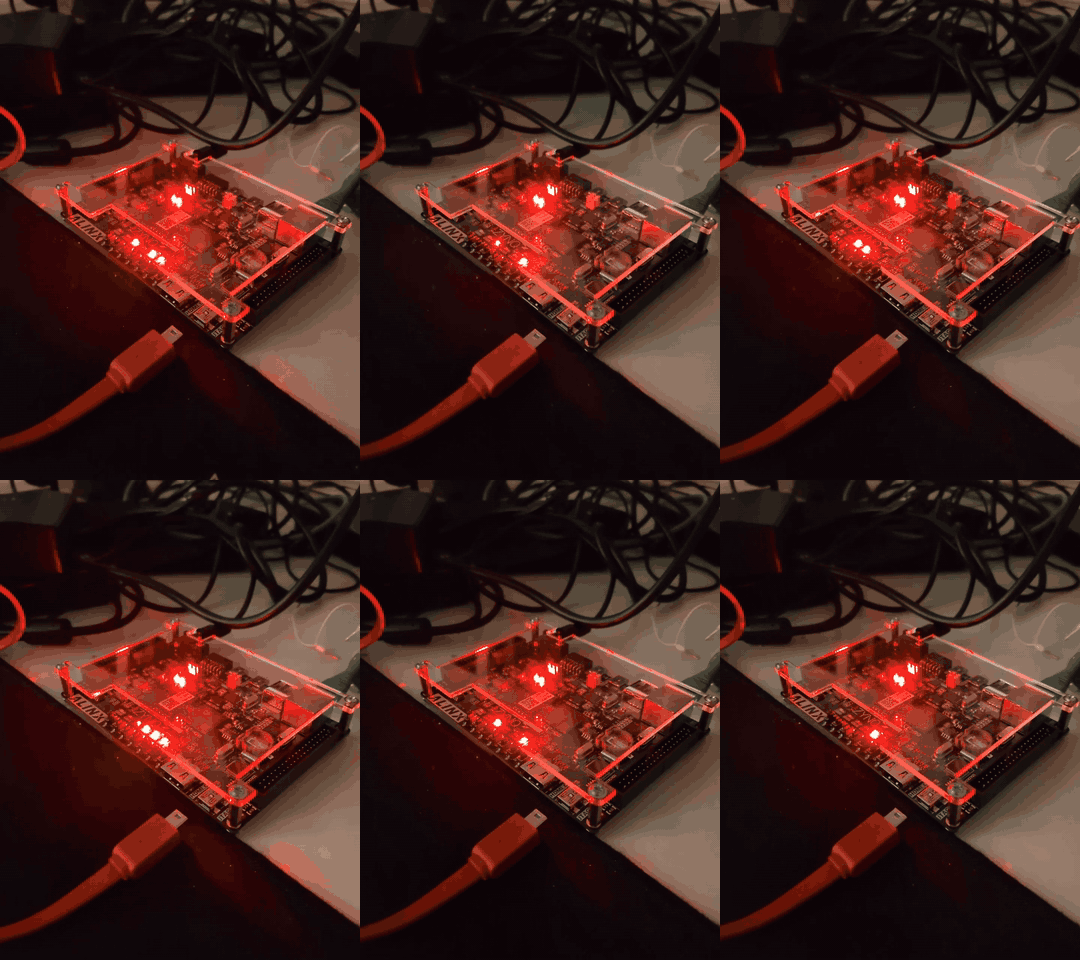
ALINX AX7020, Stage 5 Complete: Cold Power-On to a Bitstream API, Nobody Logged In
Stephan BökelmannThe last article ended with a working chain and an honest caveat: every piece had been exercised once, by hand, and the next power cycle would take it all away. This one removes the caveat. Since yesterday evening the board does the whole thing on its own.
20:44:22  U-Boot: DHCP client bound to address 10.42.100.153
20:44:32  U-Boot: ## Loading kernel (any) from FIT Image at 02000000 ...
          maintenance system (systemd) -> ax7020-update.service -> image server -> kexec
          API image: GET http://10.42.100.156:8000/state -> {"state":"unknown",...}
          POST blinky.bit -> operating, LEDs blinking
That is a cold power-on with the JTAG adapter unplugged and nobody logged in. From the plug going into the socket to a REST endpoint answering took about a minute, and the endpoint then accepted a bitstream built with Yosys and nextpnr and put it into the FPGA.
This is the closing article of the bitstream pipeline series for the AX7020 that ALINX sent me. The plan from August said: replace every vendor black box between power-on and a configured FPGA with something whose source I can read. Here is what that turned into, what the final week added, and the detours, including a power cycle that was not one.
The whole chain, once, in order
For anyone arriving here without the previous four articles, this is the complete path from an unboxed board to a bitstream API, and what was needed from outside at each step:
| Step | What happens | Manual input | Vendor tool |
|---|---|---|---|
| 1 | Mainline U-Boot SPL and U-Boot proper loaded into RAM over JTAG with OpenOCD, then written into QSPI flash by U-Boot itself | JTAG adapter, once | none: ps7_init extracted from the vendor’s XSA zip, no Vivado, no FSBL |
| 2 | A Yocto-built maintenance Linux (kernel plus initramfs as a FIT image) fetched by U-Boot over TFTP and written into flash | one sf write over netconsole, once |
none: PetaLinux replaced by a plain Yocto layer |
| 3 | Power on. U-Boot boots the FIT from flash. systemd starts ax7020-update.service |
none | none |
| 4 | The updater fetches a manifest from a company-internal URL, downloads kernel, device tree and initramfs, verifies three SHA256 sums and two magics, and kexecs into the new system |
none | none |
| 5 | The API image comes up in RAM. systemd starts ax7020-api.service on port 8000 |
none | none |
| 6 | curl -F file=@blinky.bit loads a bitstream from Yosys, nextpnr-xilinx and prjxray through the kernel’s FPGA manager |
one curl |
none |
No SD card was ever inserted. No serial cable was ever connected. The JTAG adapter was needed exactly once for step 1, and later, as it turned out, it was better left unplugged, which is detour 4.
The seven checkpoints
As in every article of this series, each step ends in something that can be tested, because on this board the expensive failures are the ones that pass every check you did think of.
| # | After | What must be true |
|---|---|---|
| 1 | image server | curl http://10.42.0.1:8080/ax7020-latest/manifest returns four lines from a container that is read-only and bound to the LAN address only |
| 2 | API image build | bitbake ax7020-api-image succeeds; the cpio.gz exists; python3 -c 'import fastapi, uvicorn' works inside the rootfs |
| 3 | maintenance image build | the systemd-based FIT builds and dumpimage -l lists kernel, DTB and initramfs |
| 4 | new U-Boot in RAM | the bootcmd with the larger read window boots the new, larger FIT from a JTAG-loaded U-Boot |
| 5 | flash from Linux | flash-fit.sh reports three matching MD5s for the FIT and for u-boot.img, written over SSH, no jumper |
| 6 | cold boot | power off, JTAG unplugged, power on: within two minutes port 8000 answers on the address the DHCP inventory reports for ax7020 |
| 7 | the bitstream | POST /bitstream with the blinky returns operating and the LEDs blink; nobody has logged in since power-on |
If a checkpoint fails, everything before it is known-good. All self-written files live in github.com/MaxClerkwell/ax7020-bringup.
Step 1: An image server that is boring on purpose
The maintenance system needs exactly one URL to know about. It lives on the company router, as an nginx container that is read-only, bound to the LAN address only, and serves a directory:
docker run -d --name ax7020-image-server --restart unless-stopped \
  -p 10.42.0.1:8080:80 \
  -v /srv/ax7020-images:/usr/share/nginx/html:ro \
  -v /etc/ax7020-image-server/default.conf:/etc/nginx/conf.d/default.conf:ro \
  --read-only --tmpfs /var/cache/nginx --tmpfs /var/run --tmpfs /tmp nginx:alpine
The nginx configuration is two directives, autoindex on and
disable_symlinks off. Every build gets a timestamped directory, and
ax7020-latest is a symlink to the newest one. The board fetches
http://10.42.0.1:8080/ax7020-latest/manifest and nothing else. Rolling
back a bad image means moving one symlink.
On the host side, tools/publish-image.sh copies kernel, DTB and initramfs
from the Yocto deploy directory over scp, writes the manifest with the
SHA256 of each file, and repoints the symlink. Its -i switch selects
which initramfs to publish: the API image by default, or the maintenance
image, which is how the updater was tested against itself before the API
image existed.
Checkpoint 1: the manifest comes back over plain HTTP, four lines, three checksums.
Step 2: The API as a Yocto recipe
The hand-assembled version from the last article ran from a uv-installed
Python in RAM. Turning that into an image meant a set of recipes in
meta-ax7020, and one decision with more consequences than all the
recipes together.
systemd, for both images
The maintenance image had been sysvinit. The API needs a service that
starts after the network is up, restarts on failure and logs somewhere
useful; the updater needs the same. Writing that twice in init scripts, or
once in systemd, was not a hard choice. INIT_MANAGER = "systemd" went
into the build setup for both images: one init system for maintenance and
development, and the API is a unit.
[Unit]
Description=AX7020 bitstream service (FastAPI)
After=network-online.target
Wants=network-online.target

[Service]
Type=simple
WorkingDirectory=/opt/ax7020-api
ExecStart=/usr/bin/python3 -m uvicorn app:app --host 0.0.0.0 --port 8000
Restart=on-failure
RestartSec=3

[Install]
WantedBy=multi-user.target
The updater’s unit is a oneshot after network-online.target with a
fifteen-second head start for dropbear and the DHCP lease. If the update
fails for any reason, the unit fails, and the board stays in the
maintenance system, reachable over SSH. That is the entire point of the
two-image design.
What an init-system switch drags along is detour 2.
FastAPI without a build backend
Yocto scarthgap has no class for pdm-backend, which is what FastAPI’s
pyproject.toml asks for. For a pure-Python package the build step is
meaningless anyway: a py3-none-any wheel is a zip of the site-packages
tree. So classes/pypi-wheel.bbclass downloads the wheel from PyPI, checks
its SHA256 and unzips it into place. That gave fastapi 0.111.1, starlette
0.37.2, uvicorn 0.30.6, click 8.1.7 and python-multipart 0.0.9, each a
five-line recipe. pydantic, anyio and h11 come from meta-python as they
are.
uv is in the image too, as astral’s prebuilt static armv7-musl binary,
version and hash pinned, for uv run --with … experiments on the box. It
is deliberately not in the service’s start path. A service that pulls
packages from the internet on every boot is not a service, it is a hope.
The two images
ax7020-api installs app.py to /opt/ax7020-api, the PS7-only
empty.bin to /lib/firmware, and the unit, enabled.
ax7020-api-image is core-image-minimal plus that, plus dropbear and the
operator’s SSH key. It does not contain the updater: an API image with
IMAGE_URL set would fetch itself and kexec into itself forever.
Its root filesystem is 138 MB uncompressed, 53 MB as cpio.gz. That is
the first of three build errors, detour 1, and it also confirms the
architecture one last time: none of this would ever fit next to U-Boot in
32 MiB of QSPI, which is why the flash holds a small system and the
network delivers the large one.
Checkpoints 2 and 3: both images build. bitbake ax7020-api-image
virtual/kernel produces the API rootfs and the maintenance FIT in one go.
Step 3: New U-Boot, new FIT, no jumper
The systemd-based maintenance FIT is 21.4 MB. The bootcmd compiled into
U-Boot in Stage 3 read 16 MiB from flash. Detour 3 is what that looks like
from the outside; the fix is one number:
CONFIG_BOOTCOMMAND="sf probe 0 30000000 0; sf read 0x2000000 0x340000 0x1800000; bootm 0x2000000"
24 MiB, with the partition allowing 28.75. Getting the new U-Boot onto the
board without touching the jumper was a small piece of choreography. The
running U-Boot was halted over JTAG, MMU and caches switched off in SCTLR,
u-boot.bin loaded into DDR at 0x4000000, the program counter set, and
execution resumed. That U-Boot booted the new FIT from TFTP, the
maintenance system in it fetched the API image and kexeced into it, and
from that running Linux the permanent copy of u-boot.img was written into
its flash partition.
Writing flash from Linux is tools/flash-fit.sh: upload over SSH, dd
into /dev/mtdblockN, which erases by itself, read back, compare three
MD5s. It refuses to touch partition 0 (boot.bin needs the JTAG procedure)
and partition 2 (the U-Boot environment). Two BusyBox details of the
systemd image cost a few minutes: its dd has no conv=fsync and its
head has no -c, so the read-back uses dd bs=4 count=… instead.
Checkpoints 4 and 5: the new U-Boot boots the large FIT, and both the
FIT and u-boot.img are in flash with matching checksums, written from
the running board.
Step 4: The cold boot
Power off. JTAG unplugged, for reasons that became clear in detour 4. Power on. Watch the DHCP log and the image server’s access log:
20:44:22  U-Boot: DHCP client bound to address 10.42.100.153
20:44:32  U-Boot: ## Loading kernel (any) from FIT Image at 02000000 ...
Then the maintenance kernel comes up, systemd reaches
network-online.target, the updater waits its fifteen seconds, fetches the
manifest and three files, verifies them, and kexecs. Six seconds later
the API kernel’s first line appears; about thirty seconds after that,
ax7020-api.service is listening. The board has, in the meantime, taken a
second DHCP lease under a new address, which is detour 5.
IP=$(curl -s http://10.42.0.1:8000/get_all_network_clients \
     | jq -r '.clients[] | select(.hostname=="ax7020" and .active_lease) | .ip')
curl http://$IP:8000/state
curl -F file=@bitstream/blinky/blinky.bit http://$IP:8000/bitstream
{"state":"unknown","name":"Xilinx Zynq FPGA Manager","loaded":null,...}
{"state":"operating","sha256":"f69a32d2…","bytes":4045524,"idcode":"0x03727093","filename":"blinky.bit"}
The LEDs blink. Nobody has logged in since the plug went in.
Checkpoints 6 and 7. Stage 5 is complete, and with it the plan.
What “done” means here, and what it does not
The pipeline from the concept article exists and runs unattended. Every component between the first DDR register write and the configuration frames in the fabric came out of a toolchain with readable source: mainline U-Boot instead of the FSBL, a Yocto layer instead of PetaLinux, Yosys and nextpnr-xilinx instead of Vivado, a sysfs node instead of a programming cable, an HTTP endpoint instead of a person at a keyboard.
Three things are deliberately not in it yet, and they are the difference between “the pipeline works” and “the pipeline is a product”:
- Authentication. Anyone who can reach port 8000 loads bitstreams, and a bitstream with an AXI master writes anywhere in RAM. On a private lab network behind the company router this is an accepted, labelled risk. It is the first thing to add before the board is reachable from anywhere else.
- A bitstream in the manifest. After boot the PL is empty until
someone posts a design. A fourth manifest line, `bitstream
`, loaded by the API service at start, would make the board come up with a known design, and would finally give the real-time clock its EMIO pins. - A build stamp. Three versions of the same system that look identical
caused more confusion this week than any bug.
/etc/ax7020-releasewith the build timestamp and the manifest it came from, shown in/state, is a two-line change to the recipe.
The detours
1. INITRAMFS_MAXSIZE
The first API image build stopped with the initramfs over Yocto’s default limit of 128 MB. The limit exists for boards with far less than 1 GiB of RAM and is a sanity check, not a technical bound. Raised to 512 MB, done. The uncompressed rootfs is 138 MB; Python, FastAPI and their dependencies account for most of the growth over the maintenance image.
2. An init-system switch is a distribution switch
Under systemd, root’s home directory is /root. Under sysvinit in Yocto it
is /home/root. The recipe that installs the operator’s SSH key had the
sysvinit path hard-coded, so the API image, first of the two to be built
with systemd, said Permission denied (publickey) to every login. Caught
before the maintenance image was flashed, which would have had the same
defect and would have been considerably less fun to recover. Fix:
${ROOT_HOME} instead of a literal path.
That was the visible one. The BusyBox in the systemd image is configured
differently, hence the missing dd and head options in Step 3. Units
replace init scripts. The image is a few megabytes larger, which is detour
- None of these is a problem; each of them shows up separately, on its own schedule.
3. Sizes grow, constants do not
The bootcmd from Stage 3 read exactly 16 MiB of flash because the FIT was
14 MB at the time, and “leave room to grow” meant two megabytes. The
systemd-based maintenance system is 21.4 MB. U-Boot loaded 16 MiB of it and
said:
Bad FIT kernel image format! (err=-22)
and dropped to its prompt, where, on the company switch, it is unreachable, because U-Boot’s network stack and the switch’s spanning tree still do not get along (Stage 3, detour 6). A fixed read window in a bootloader is a time bomb with the fuse set to “the next larger image”. The new value is 24 MiB, and the note in the repository says so in capitals.
4. The power cycle that was not one
After the new U-Boot had been written to flash, the boot ROM parked at
0xffffff28, the address it goes to when it finds no valid boot image. The
linear QSPI window read all zeros over JTAG. A power cycle changed nothing,
even though the reboot status register confirmed a power-on reset had
happened.
The explanation is electrical, and it is the same physics that showed up on day one of this project, when the JTAG chain was visible on a board that was supposedly off. The FT232H adapter holds TMS at 3.3 V. Through the protection diodes of the JTAG pins, that pin feeds the board’s 3.3 V rail, weakly, but enough. The flash chip, which after a Linux session is sitting in 4-byte address mode (Stage 4, detour 3), never lost power, never reset, and kept answering 3-byte reads from the boot ROM with garbage. With the USB adapter unplugged, the board booted immediately.
“Power-cycled” is a claim. The adapter on the JTAG port disagrees. For the final cold-boot test the adapter stayed in the drawer.
5. The IP address is not a name
Over one afternoon the board’s address went from .134 to .144, .149,
.153 and .156. U-Boot takes a DHCP lease; the maintenance kernel takes
another; the API kernel after kexec takes a third, each with the same MAC
but from a fresh client state, and the server hands out whatever is free.
Every script that had an address in it broke at some point during the day.
The only reliable source is the
DHCP inventory API
on the router, queried by hostname, filtered to the active lease. The
curl in Step 4 is the version that survives.
Closing
The score for the final week: three build errors, all found before they reached flash; one bootloader constant that outlived its assumption; one JTAG adapter that kept a flash chip alive through a power cycle; and an address that changed five times in an afternoon. The pattern held to the end. The silent failures were the ones where a check confirmed a wrong thing, and the countermeasure was the same as in every earlier article: test the property you actually need. Not “the board rebooted” but “the flash chip lost power”. Not “the IP I wrote down” but “the lease the server holds for this hostname”.
Three and a half weeks ago the plan listed five stages and expected them to get uncomfortable. They did, in ways the vendor documentation could not have described, because the vendor path avoids every one of them by never letting you leave it. That was the reason for taking the other path, and it held up: the discomfort was the content.
Everything is in github.com/MaxClerkwell/ax7020-bringup: the U-Boot files, the Yocto layer with both images and the wheel class, the updater and its unit, the API and its unit, the publish and flash tools, the bitstream flow, and the walkthroughs of every stage in longer form. The series index is at maxclerkwell.tech/alinx.
If you make development boards and would like one taken apart like this, in public, with open tools and the failures left in, write to collaboration@maxclerkwell.tech.
And because a pipeline that ends in “the LEDs blink” deserves to show it: